# 处理机有哪两种状态?
# 简要回答
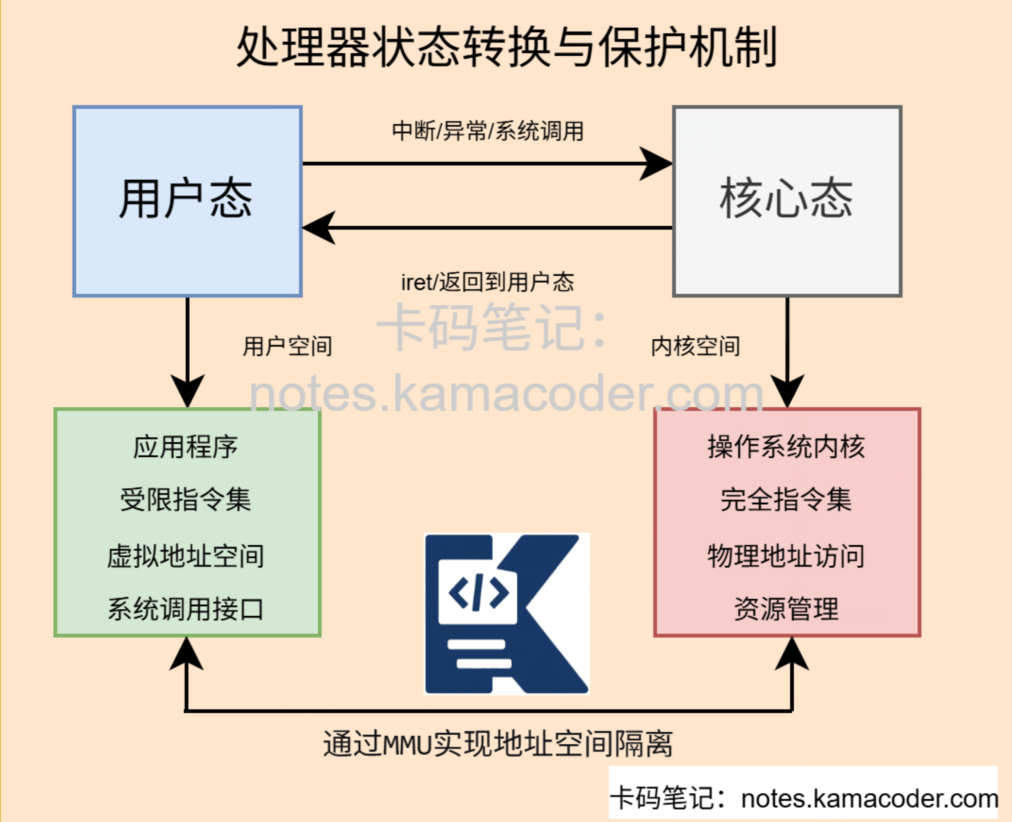
处理机(CPU)在操作系统中主要运行在两种状态:核心态(Kernel Mode)和用户态(User Mode)。
核心态具有完全的系统控制权限,可以执行所有指令和访问所有内存;
用户态则受限,只能执行非特权指令和访问用户空间内存。
两种状态的分离保证了操作系统的安全性和稳定性。
# 专业回答
处理机的两种状态——核心态和用户态,是现代操作系统架构的基石。
核心态,又称为特权态、管态或系统态,是CPU执行操作系统内核代码时的工作状态。
在此状态下,CPU拥有最高特权级别,可以执行所有指令集中的指令,包括特权指令如开关中断、修改页表、直接进行I/O操作等;
可以访问整个物理内存地址空间,包括内核空间和用户空间;可以直接操作所有硬件资源,如设备控制器、中断控制器、时钟等。
用户态,又称普通态或目态,是CPU运行用户应用程序时的工作状态。
在此状态下,CPU的特权级别受到严格限制:只能执行非特权指令,若尝试执行特权指令会触发保护异常;
所有硬件操作必须通过操作系统提供的接口间接完成。
这两种状态的分离通过CPU硬件机制实现,包括模式位、内存保护单元、特权指令检查等。
状态切换通过特定的触发条件完成:从用户态切换到核心态主要通过系统调用(应用程序主动请求内核服务)、中断(外部设备请求服务)和异常(程序错误或特殊条件)三种途径;
从核心态返回用户态则通过中断返回指令或进程上下文切换。
# 代码示例
#include <iostream>
#include <stdexcept>
#include <vector>
#include <string>
#include <thread>
#include <chrono>
#include <mutex>
#include <queue>

using namespace std;

// 模拟CPU模式位
enum class CPUMode {
    USER_MODE,
    KERNEL_MODE
};

// 模拟特权指令
enum class InstructionType {
    NON_PRIVILEGED,  // 非特权指令
    PRIVILEGED       // 特权指令
};

// 模拟CPU异常
class CPUException : public runtime_error {
public:
    CPUException(const string& msg) : runtime_error(msg) {}
};

// 模拟保护异常
class ProtectionFaultException : public CPUException {
public:
    ProtectionFaultException(const string& msg) : CPUException(msg) {}
};

// 模拟CPU类
class CPU {
private:
    CPUMode currentMode;
    int programCounter;
    bool interruptsEnabled;
    mutex modeMutex;

    // 模拟寄存器
    struct Registers {
        int eax, ebx, ecx, edx;
        int esp, ebp;  // 栈指针
        int eip;        // 指令指针
        int eflags;     // 状态寄存器
    } registers;

    // 模拟系统调用号
    enum SyscallNumber {
        SYS_READ = 0,
        SYS_WRITE = 1,
        SYS_OPEN = 2,
        SYS_CLOSE = 3,
        SYS_EXIT = 4,
        SYS_FORK = 5
    };

public:
    CPU() : currentMode(CPUMode::KERNEL_MODE), programCounter(0),
            interruptsEnabled(true) {
        cout << "[CPU] 初始化,启动时处于核心态" << endl;
    }

    // 获取当前模式
    CPUMode getCurrentMode() const {
        return currentMode;
    }

    // 切换到核心态
    void switchToKernelMode() {
        lock_guard<mutex> lock(modeMutex);
        cout << "[CPU] 模式切换: 用户态 → 核心态" << endl;
        currentMode = CPUMode::KERNEL_MODE;
        // 模拟TLB刷新等操作
        this_thread::sleep_for(chrono::milliseconds(1));
    }

    // 切换到用户态
    void switchToUserMode() {
        lock_guard<mutex> lock(modeMutex);
        cout << "[CPU] 模式切换: 核心态 → 用户态" << endl;
        currentMode = CPUMode::USER_MODE;
        // 模拟TLB刷新等操作
        this_thread::sleep_for(chrono::milliseconds(1));
    }

    // 执行指令(模拟指令执行)
    void executeInstruction(const string& instruction, InstructionType type) {
        if (type == InstructionType::PRIVILEGED && currentMode == CPUMode::USER_MODE) {
            throw ProtectionFaultException("用户态尝试执行特权指令: " + instruction);
        }

        cout << "[CPU] 执行指令: " << instruction;
        cout << " (模式: " << (currentMode == CPUMode::USER_MODE ? "用户态" : "核心态") << ")" << endl;

        programCounter++;
        this_thread::sleep_for(chrono::milliseconds(50));  // 模拟指令执行时间
    }

    // 模拟系统调用(用户态→核心态→用户态)
    int syscall(SyscallNumber number, int arg1 = 0, int arg2 = 0, int arg3 = 0) {
        cout << "\n[系统调用] 进程发起系统调用 #" << number << endl;

        // 保存用户态上下文
        auto savedRegisters = registers;
        auto savedPC = programCounter;

        try {
            // 切换到核心态
            switchToKernelMode();

            // 根据系统调用号执行相应操作
            int result = handleSyscall(number, arg1, arg2, arg3);

            // 切换回用户态
            switchToUserMode();

            // 恢复用户态上下文(除了返回值)
            registers = savedRegisters;
            registers.eax = result;  // 系统调用返回值放在eax
            programCounter = savedPC + 1;

            cout << "[系统调用] 返回用户态,返回值: " << result << endl;
            return result;

        } catch (const exception& e) {
            // 异常处理
            cerr << "[系统调用] 错误: " << e.what() << endl;
            switchToUserMode();
            registers = savedRegisters;
            programCounter = savedPC;
            return -1;  // 错误返回值
        }
    }

    // 模拟中断处理
    void handleInterrupt(int interruptNumber) {
        cout << "\n[中断] 接收到中断 #" << interruptNumber << endl;

        // 保存当前上下文(无论当前模式)
        auto savedMode = currentMode;
        auto savedRegisters = registers;
        auto savedPC = programCounter;

        try {
            // 切换到核心态(如果不在核心态)
            if (currentMode != CPUMode::KERNEL_MODE) {
                switchToKernelMode();
            }

            // 执行中断处理程序
            executeInterruptHandler(interruptNumber);

            // 恢复之前模式
            if (savedMode == CPUMode::USER_MODE) {
                switchToUserMode();
            }

            // 恢复上下文
            registers = savedRegisters;
            programCounter = savedPC;

            cout << "[中断] 处理完成,返回原模式" << endl;

        } catch (const exception& e) {
            cerr << "[中断] 处理错误: " << e.what() << endl;
            // 发生严重错误,可能进入panic状态
        }
    }

private:
    // 处理系统调用(核心态)
    int handleSyscall(SyscallNumber number, int arg1, int arg2, int arg3) {
        cout << "[核心态] 处理系统调用 #" << number << endl;

        switch (number) {
            case SYS_READ:
                cout << "[核心态] 从文件描述符 " << arg1 << " 读取 " << arg2 << " 字节" << endl;
                // 模拟执行特权操作
                executeInstruction("访问硬盘控制器", InstructionType::PRIVILEGED);
                executeInstruction("DMA传输数据", InstructionType::PRIVILEGED);
                executeInstruction("复制数据到用户空间", InstructionType::PRIVILEGED);
                return arg2;  // 返回读取的字节数

            case SYS_WRITE:
                cout << "[核心态] 向文件描述符 " << arg1 << " 写入 " << arg2 << " 字节" << endl;
                executeInstruction("检查用户缓冲区", InstructionType::PRIVILEGED);
                executeInstruction("复制数据到内核缓冲区", InstructionType::PRIVILEGED);
                executeInstruction("启动磁盘写操作", InstructionType::PRIVILEGED);
                return arg2;  // 返回写入的字节数

            case SYS_OPEN:
                cout << "[核心态] 打开文件: " << arg1 << endl;
                executeInstruction("检查文件路径", InstructionType::PRIVILEGED);
                executeInstruction("分配文件描述符", InstructionType::PRIVILEGED);
                return 3;  // 返回文件描述符

            case SYS_EXIT:
                cout << "[核心态] 进程退出,状态码: " << arg1 << endl;
                executeInstruction("释放进程资源", InstructionType::PRIVILEGED);
                executeInstruction("通知调度器", InstructionType::PRIVILEGED);
                return 0;

            default:
                throw runtime_error("未知系统调用");
        }
    }

    // 执行中断处理程序
    void executeInterruptHandler(int interruptNumber) {
        cout << "[核心态] 执行中断处理程序 #" << interruptNumber << endl;

        switch (interruptNumber) {
            case 0:  // 时钟中断
                cout << "[核心态] 处理时钟中断" << endl;
                executeInstruction("保存时钟计数", InstructionType::PRIVILEGED);
                executeInstruction("更新进程时间片", InstructionType::PRIVILEGED);
                executeInstruction("检查是否需要调度", InstructionType::PRIVILEGED);
                break;

            case 1:  // 键盘中断
                cout << "[核心态] 处理键盘中断" << endl;
                executeInstruction("读取键盘扫描码", InstructionType::PRIVILEGED);
                executeInstruction("转换为字符", InstructionType::NON_PRIVILEGED);
                executeInstruction("放入输入缓冲区", InstructionType::PRIVILEGED);
                break;

            case 2:  // 硬盘中断
                cout << "[核心态] 处理硬盘中断" << endl;
                executeInstruction("读取硬盘状态", InstructionType::PRIVILEGED);
                executeInstruction("DMA传输完成处理", InstructionType::PRIVILEGED);
                executeInstruction("唤醒等待进程", InstructionType::PRIVILEGED);
                break;

            default:
                cout << "[核心态] 处理未知中断" << endl;
                executeInstruction("记录错误日志", InstructionType::PRIVILEGED);
        }
    }
};

// 模拟用户进程
class UserProcess {
private:
    int pid;
    CPU& cpu;
    string name;

public:
    UserProcess(int id, CPU& cpuRef, const string& procName)
        : pid(id), cpu(cpuRef), name(procName) {}

    void run() {
        cout << "\n========== 进程 " << name << " (PID: " << pid << ") 开始运行 ==========" << endl;

        try {
            // 进程开始于用户态
            cpu.switchToUserMode();

            // 执行一些非特权指令
            cout << "\n[用户态] 执行用户代码..." << endl;
            cpu.executeInstruction("mov eax, ebx", InstructionType::NON_PRIVILEGED);
            cpu.executeInstruction("add ecx, 10", InstructionType::NON_PRIVILEGED);
            cpu.executeInstruction("cmp edx, 0", InstructionType::NON_PRIVILEGED);

            // 模拟系统调用 - 读取文件
            cout << "\n[用户态] 调用 read() 系统调用" << endl;
            int bytesRead = cpu.syscall(CPU::SYS_READ, 3, 1024, 0);
            cout << "[用户态] read() 返回: " << bytesRead << " 字节" << endl;

            // 继续执行用户代码
            cpu.executeInstruction("处理读取的数据", InstructionType::NON_PRIVILEGED);

            // 模拟系统调用 - 写入文件
            cout << "\n[用户态] 调用 write() 系统调用" << endl;
            int bytesWritten = cpu.syscall(CPU::SYS_WRITE, 3, 512, 0);
            cout << "[用户态] write() 返回: " << bytesWritten << " 字节" << endl;

            // 尝试执行特权指令(应该失败)
            cout << "\n[用户态] 尝试执行特权指令(应该触发异常)" << endl;
            try {
                cpu.executeInstruction("修改页表寄存器", InstructionType::PRIVILEGED);
                cout << "[ERROR] 不应该执行到这里!" << endl;
            } catch (const ProtectionFaultException& e) {
                cout << "[用户态] 正确捕获保护异常: " << e.what() << endl;
            }

            // 模拟系统调用 - 退出
            cout << "\n[用户态] 调用 exit() 系统调用" << endl;
            cpu.syscall(CPU::SYS_EXIT, 0);

        } catch (const exception& e) {
            cerr << "[进程 " << name << "] 发生异常: " << e.what() << endl;
        }

        cout << "========== 进程 " << name << " 结束 ==========\n" << endl;
    }
};

// 模拟时钟中断线程
void clockInterruptThread(CPU& cpu, int intervalMs) {
    int ticks = 0;
    while (ticks++ < 5) {  // 模拟5次时钟中断
        this_thread::sleep_for(chrono::milliseconds(intervalMs));
        cpu.handleInterrupt(0);  // 时钟中断号为0
    }
}

// 模拟键盘中断线程
void keyboardInterruptThread(CPU& cpu) {
    this_thread::sleep_for(chrono::milliseconds(150));
    cpu.handleInterrupt(1);  // 键盘中断号为1
}

// 模拟硬盘中断线程
void diskInterruptThread(CPU& cpu) {
    this_thread::sleep_for(chrono::milliseconds(300));
    cpu.handleInterrupt(2);  // 硬盘中断号为2
}

// 演示程序
void demonstrateCPUModes() {
    cout << "====== CPU用户态/核心态演示程序 ======" << endl;
    cout << "演示进程执行、系统调用、中断处理和异常捕获\n" << endl;

    // 创建CPU模拟器
    CPU cpu;

    // 启动中断模拟线程
    thread clockThread(clockInterruptThread, ref(cpu), 200);
    thread keyboardThread(keyboardInterruptThread, ref(cpu));
    thread diskThread(diskInterruptThread, ref(cpu));

    // 创建并运行用户进程
    UserProcess proc1(1001, cpu, "文本编辑器");
    UserProcess proc2(1002, cpu, "计算器");

    // 模拟进程执行(在实际操作系统中由调度器控制)
    proc1.run();

    // 等待中断线程完成
    clockThread.join();
    keyboardThread.join();
    diskThread.join();

    cout << "\n====== 演示结束 ======" << endl;

    // 演示模式切换开销
    cout << "\n====== 模式切换开销分析 ======" << endl;

    auto start = chrono::high_resolution_clock::now();
    for (int i = 0; i < 1000; i++) {
        cpu.switchToKernelMode();
        cpu.switchToUserMode();
    }
    auto end = chrono::high_resolution_clock::now();

    auto duration = chrono::duration_cast<chrono::microseconds>(end - start);
    cout << "1000次模式切换总时间: " << duration.count() << " 微秒" << endl;
    cout << "平均每次切换时间: " << duration.count() / 1000.0 << " 微秒" << endl;
    cout << "注:实际模式切换时间约0.1-1微秒,这里模拟了额外开销" << endl;
}

// 实际场景演示:内存访问保护
void demonstrateMemoryProtection() {
    cout << "\n====== 内存访问保护演示 ======" << endl;

    CPU cpu;

    // 模拟内核空间和用户空间
    class MemoryManager {
    private:
        vector<int> kernelMemory;
        vector<int> userMemory;
        CPUMode currentMode;

    public:
        MemoryManager() : kernelMemory(1000, 0), userMemory(1000, 0) {}

        void setMode(CPUMode mode) { currentMode = mode; }

        int readMemory(bool isKernelSpace, int address) {
            if (isKernelSpace && currentMode == CPUMode::USER_MODE) {
                throw ProtectionFaultException("用户态尝试读取内核内存");
            }

            if (isKernelSpace) {
                return kernelMemory[address % kernelMemory.size()];
            } else {
                return userMemory[address % userMemory.size()];
            }
        }

        void writeMemory(bool isKernelSpace, int address, int value) {
            if (isKernelSpace && currentMode == CPUMode::USER_MODE) {
                throw ProtectionFaultException("用户态尝试写入内核内存");
            }

            if (isKernelSpace) {
                kernelMemory[address % kernelMemory.size()] = value;
            } else {
                userMemory[address % userMemory.size()] = value;
            }
        }
    };

    MemoryManager mem;

    // 核心态下可以访问所有内存
    mem.setMode(CPUMode::KERNEL_MODE);
    cout << "[核心态] 写入内核内存: 成功" << endl;
    mem.writeMemory(true, 0x1000, 42);
    cout << "[核心态] 读取内核内存: " << mem.readMemory(true, 0x1000) << endl;
    cout << "[核心态] 写入用户内存: 成功" << endl;
    mem.writeMemory(false, 0x2000, 100);

    // 用户态下只能访问用户内存
    mem.setMode(CPUMode::USER_MODE);
    cout << "[用户态] 写入用户内存: 成功" << endl;
    mem.writeMemory(false, 0x2000, 200);
    cout << "[用户态] 读取用户内存: " << mem.readMemory(false, 0x2000) << endl;

    // 尝试访问内核内存(应该失败)
    cout << "[用户态] 尝试读取内核内存: ";
    try {
        int value = mem.readMemory(true, 0x1000);
        cout << "错误:读取成功,得到 " << value << endl;
    } catch (const ProtectionFaultException& e) {
        cout << "正确触发保护异常" << endl;
    }
}

int main() {
    demonstrateCPUModes();
    demonstrateMemoryProtection();
    return 0;
}
2
3
4
5
6
7
8
9
10
11
12
13
14
15
16
17
18
19
20
21
22
23
24
25
26
27
28
29
30
31
32
33
34
35
36
37
38
39
40
41
42
43
44
45
46
47
48
49
50
51
52
53
54
55
56
57
58
59
60
61
62
63
64
65
66
67
68
69
70
71
72
73
74
75
76
77
78
79
80
81
82
83
84
85
86
87
88
89
90
91
92
93
94
95
96
97
98
99
100
101
102
103
104
105
106
107
108
109
110
111
112
113
114
115
116
117
118
119
120
121
122
123
124
125
126
127
128
129
130
131
132
133
134
135
136
137
138
139
140
141
142
143
144
145
146
147
148
149
150
151
152
153
154
155
156
157
158
159
160
161
162
163
164
165
166
167
168
169
170
171
172
173
174
175
176
177
178
179
180
181
182
183
184
185
186
187
188
189
190
191
192
193
194
195
196
197
198
199
200
201
202
203
204
205
206
207
208
209
210
211
212
213
214
215
216
217
218
219
220
221
222
223
224
225
226
227
228
229
230
231
232
233
234
235
236
237
238
239
240
241
242
243
244
245
246
247
248
249
250
251
252
253
254
255
256
257
258
259
260
261
262
263
264
265
266
267
268
269
270
271
272
273
274
275
276
277
278
279
280
281
282
283
284
285
286
287
288
289
290
291
292
293
294
295
296
297
298
299
300
301
302
303
304
305
306
307
308
309
310
311
312
313
314
315
316
317
318
319
320
321
322
323
324
325
326
327
328
329
330
331
332
333
334
335
336
337
338
339
340
341
342
343
344
345
346
347
348
349
350
351
352
353
354
355
356
357
358
359
360
361
362
363
364
365
366
367
368
369
370
371
372
373
374
375
376
377
378
379
380
381
382
383
384
385
386
387
388
389
390
391
392
393
394
395
396
397
398
399
400
401
402
403
404
405
406
407
408
409
410
411
412
413
414
415
416
417
418
419
420
421
422
423
424
425
426
427
428
429
430
431
432
433
434
435
436
437
438
439
440
441
442
# 知识拓展
现代I/O技术的发展
- 知识图解
- 面试官很能追问
Q1:用户态程序如何执行需要特权的操作?
A1:用户态程序通过系统调用接口请求操作系统内核代为执行特权操作。
当程序调用如read()、write()、fork()等库函数时,这些函数会触发特殊的软中断指令或快速系统调用指令,导致CPU从用户态切换到核心态。
Q2:模式切换的具体开销包括哪些?
A2: 模式切换的开销包括直接开销和间接开销两部分。
直接开销主要来自硬件操作:保存和恢复用户态上下文需要操作数十个寄存器;
切换栈指针到内核栈,更新CPU模式位和控制寄存器,刷新TLB或切换地址空间ID。
间接开销更为显著:TLB失效导致后续内存访问需要页表遍历;缓存污染因用户和内核数据混合降低命中率;分支预测失效导致流水线清空;现代CPU推测执行被打断。
评论
验证登录状态...